

Esta página aún no está traducida al español, así que estás leyendo la versión en inglés.
Who is coming and attendance
Open a class's roster, mark who came, add a walk in and download the list. Coaches mark the same attendance from the app.
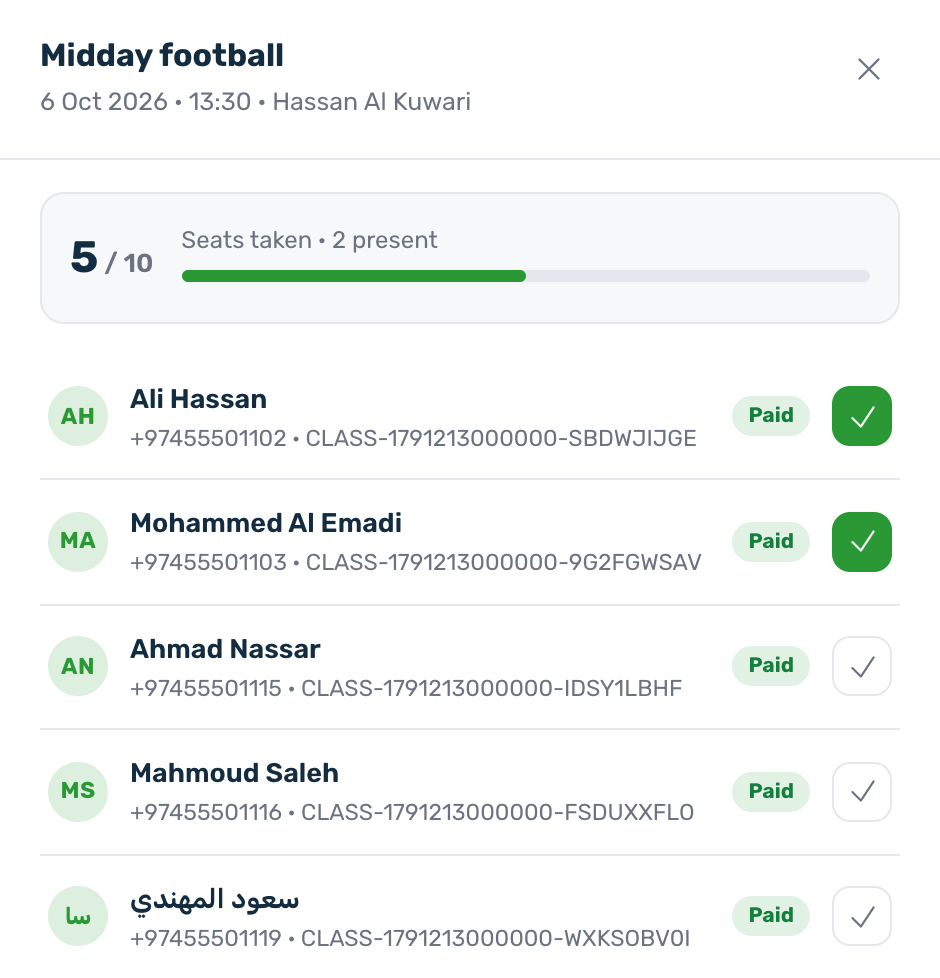
On the board, press Who is coming on a class. The drawer shows the seats taken and every person booked, with their payment state: Paid, Pending, Refunded, Cancelled or Failed. A seat is only taken once the payment goes through: someone still Pending is listed but holds no seat, and a free class is taken at once.
Mark attendance#
- Tick a person to mark them present, and tick again to clear it.
- Mark all present marks everyone at once.
- The count at the top shows how many are present.
A coach with app access marks the same attendance from the coach area, from the day of the class. Both places write to one record, so what one marks the other sees.
Add a walk in#
For someone who turned up without booking, press Add walk in, type the Name and an optional Phone, and add them. A walk in is recorded as paid and present, takes a seat on the class, and shows in the coach's roster with the name and phone you typed.
Download the roster#
- Download in the drawer gives the roster of one session. For a course, download it from the course in the Courses view.
- Choose Paid only or Everyone except cancelled.
- Export on the board gives a report of every programme over a date range, with a maximum number of days per report.